What to Do When Azure Web App Backups Keep Failing

Azure web app backups can fail for a variety of reasons.  Recently, I had a web app fail for a reason I hadn’t seen before.  I was certain that my backups were working correctly… nope.  Not exactly.  They actually hadn’t been working for some time.  This time was different from the others – the deployed web app was too big.



Apparently, there’s a limit of the backup size (10GB) for web apps and the associated DBs if you are backing up in tandem (4GB individual limit for DBs), and this app was over that limit.  Side note: if the database you are backing up is constantly growing – consider using a different method for backing up this data.

Upon further inspection of the web app, I saw that there were a lot of log and deployment files that didn’t need to be backed up, but that I didn’t necessarily want to delete in case I needed them.

There is an answer to this conundrum though: a _backup.filter file.

Simply create a file and save it as _backup.filter on your local drive.

In this file, list out the directories that you want to exclude from your backups (one on each line).  Mine looks like this:
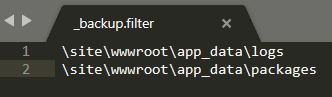


I’ve excluded 2 directories from my app, 1 contains the log files and 1 contains uploaded packages.

Once you’ve created this file, simply upload it to your web app in the wwwroot folder and voila!

Here’s a sample of the difference it makes it excluding large directories from your backups:



May the Cloudforce be with you!

Daniel Ruberg
Author

Daniel has over 8 years of Network Administration and Engineering experience. He finished his undergraduate degree in Computer Management Information Systems from Liberty University in 2008. He's obtained several industry leading certifications including: Certified Information Systems Security Professional (CISSP), AZ-300 & AZ-301: Microsoft® Azure Solutions Architect Expert, AZ-500: Microsoft® Azure Security Technologies, Microsoft® Certified Solutions Expert: Cloud Platform and Infrastructure. Daniel has deployed, managed, and migrated several production workloads to Microsoft Azure utilizing the latest technologies that the Microsoft cloud has to offer.

Recommended for you.

What 43,000 students getting governed AI access in weeks actually looked like

What 43,000 students getting governed AI access in weeks actually looked like


Warning: Undefined variable $post in /bitnami/wordpress/wp-content/themes/cfwp/functions.php on line 141

Warning: Attempt to read property "ID" on null in /bitnami/wordpress/wp-content/themes/cfwp/functions.php on line 141

For higher education leaders, the most important AI question is often not whether the technology works. It is whether the institution can make it available broadly, safely, and quickly enough to...

August 26 2026 Blog
Your Projects, Now Easier to Share, Plus Smarter Filters, Comment Controls, and a Clearer View of Context

Your Projects, Now Easier to Share, Plus Smarter Filters, Comment Controls, and a Clearer View of Context


Warning: Undefined variable $post in /bitnami/wordpress/wp-content/themes/cfwp/functions.php on line 141

Warning: Attempt to read property "ID" on null in /bitnami/wordpress/wp-content/themes/cfwp/functions.php on line 141

TLDR: This release turns Projects from a personal workspace into a collaborative one. You can now share a Project with your team and control exactly what each collaborator can do, without needing an...

August 24 2026 Blog
A licensing agreement is not a campus-wide AI strategy

A licensing agreement is not a campus-wide AI strategy


Warning: Undefined variable $post in /bitnami/wordpress/wp-content/themes/cfwp/functions.php on line 141

Warning: Attempt to read property "ID" on null in /bitnami/wordpress/wp-content/themes/cfwp/functions.php on line 141

Higher education’s Shadow AI problem is changing. The first wave was easy to recognize: faculty, staff, and students using public generative AI tools without institutional oversight. Today, many...

August 04 2026 Blog