TLDR: This release turns Projects from a personal workspace into a collaborative one. You can now share a Project with your team and control exactly what each collaborator can do, without needing an administrator involved. Alongside that, Agent list filters give admins a faster way to manage Agents at scale, Artifact comment controls give owners full command of their feedback threads, and context compaction keeps long conversations running smoothly with full visibility into usage. These updates make the AI work already happening across your organization easier to share, govern, and sustain at scale.
Our last release introduced Projects as a way to organize your own AI work: files, instructions, and chats grouped around the work your team is actually doing, instead of scattered across a chat history. We called that release the foundation. This release extends that foundation from individual organization to shared execution.
The headline this time is sharing: Projects are no longer a solo workspace. But we’re also shipping three updates that make the platform easier to manage and easier to work in day-to-day: better filtering for Agent lists, more control over Artifact comments, and visibility into context-window usage and tools to preserve continuity in long-running conversations.
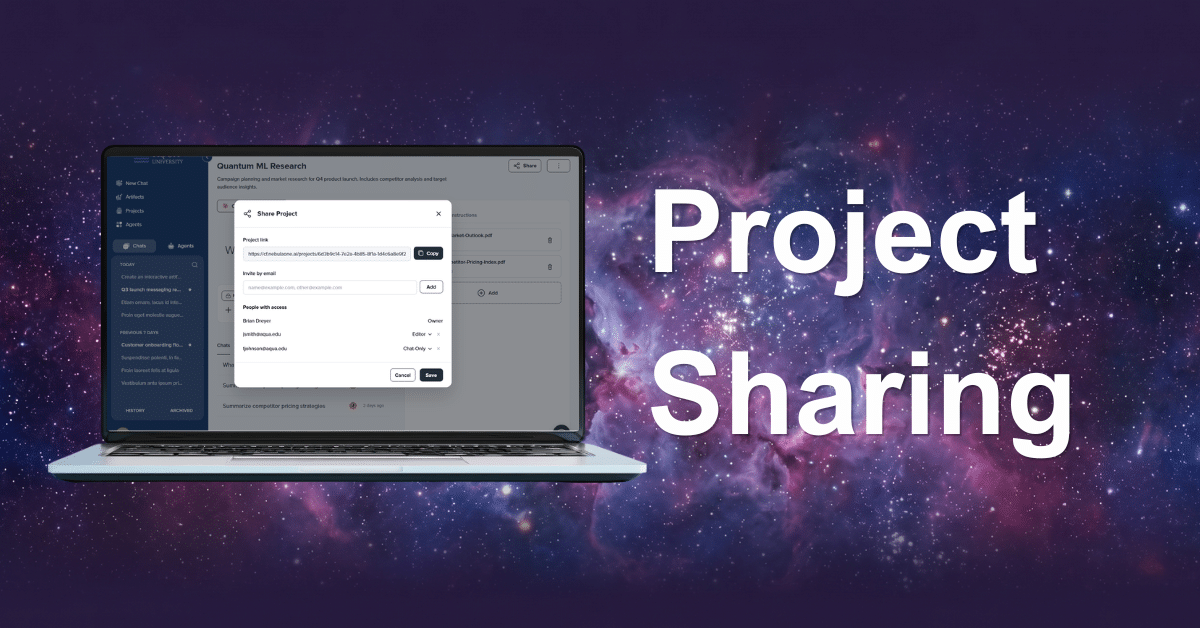
1. Your Projects, Now Easier to Share
Once teams begin using projects, the next question is predictable: this is great for me, but how do I get my team in here?
Now you can. You can share a Project directly with your teammates. No administrator required, no waiting on IT to provision access. You invite the people who need to be there, and they’re in.
Sharing isn’t all-or-nothing. Each collaborator gets a role that controls what they can actually do inside the Project:
- View – use the project’s shared context
- Contribute – add work to the project
- Or manage: update collaborators, files, and instructions
This way you decide who can work with the Project’s files and instructions in chat, who can add to it, and who can change the underlying files and instructions. You stay in control of who’s involved, without opening a ticket to get there.

The real value here isn’t just sharing chats. It’s sharing knowledge sources, and making sure everyone working from the same material is actually working from the same version of it.
Take marketing as an example. A positioning and messaging document is the foundation for every piece of content a team produces: sales decks, blog posts, campaign copy, one-pagers. When that document lives inside a shared Project, every new asset gets built against the same source of truth automatically. The team works from the current approved source material, rather than disconnected local copies.
As we look at the future of AI work, individual productivity is only the starting point. The real value of AI shows up when a team can work from the same context, the same files, and the same shared history without re-explaining themselves every time someone new joins the work. That’s the difference between AI being a personal tool and AI being how your team actually operates. Projects gives people a place to organize their own work. Sharing turns that into a place where teams get work done together, and that’s the direction this platform is headed.
That same logic extends beyond product marketing teams. A professor running a group assignment can set up a Project with the syllabus, rubric, and research materials loaded once, then share it with the whole student team. Every student works from the same instructions and the same source files, instead of five separate group members re-uploading the same PDF or working off a version of the prompt someone forwarded over email. When theshared guidance changes, the Project becomes the single current reference for the team.
Whether it’s a marketing team building on a shared positioning document or a student team working through a shared assignment, the underlying value is the same: a team isn’t reconstructing the same background information in five separate chats. They’re working from one source of truth, in real time, with every new piece of work grounded in it.
2. Artifact Comments
Anyone with access to an Artifact can leave feedback directly on the work, where the relevant context is visible. That matters because feedback tied directly to the Artifact stays with it: context doesn’t get lost, and anyone reviewing the thread later can see exactly what was flagged and why.
Artifacts have always made it easy to generate and share code and content without leaving chat. Now they’re easier to collaborate around; a department can review an admissions FAQ, policy summary, or campaign draft in one place, without splitting decisions across email, chat, and document versions

3. Context Compaction
Long AI conversations eventually hit a wall: the context window fills up, and either the conversation degrades, or it gets cut off entirely, usually without warning.
This release gives users visibility into exactly how full their context window is, with a full breakdown of what’s using that space. Compaction now happens automatically at specific usage thresholds, and users can also trigger it manually whenever they want to reclaim room. The result is longer, uninterrupted conversations, without the guesswork of wondering when things are about to break.

4. Enhanced Agent List Filters
As organizations deploy more Agents, governance and maintenance become harder, especially for admins managing both Official and Personal Agent lists at scale.
Admins can now filter Agent lists by:
- Model
- User Group
- Status
- Access
- Date last used.
If you need to find every Agent running on a deprecated model before a bulk replacement, or every Agent a specific group has access to before an audit, you can get there in seconds instead of scrolling. This release also includes behind-the-scenes refinements that make filtering faster and more reliable across larger Agent libraries.

It saves time the moment your Agent count crosses from a small collection to an institutional Agent catalogue.
Summarizing the Release
Projects gave people a place to organize their own work. Sharing turns that into a place where teams get work done together. Agent list filters, Artifact comment controls, and context compaction round out the release with the kind of day-to-day improvements that make the platform easier to collaborate on, govern, and sustain as adoption expands.
 by
by