Dealing with over-sized disks in Azure

How to downsize a data disk on an Azure VM


Even with the best intentions, we often find that customers have dozens or hundreds of virtual machines in Azure which are using a small fraction of the disk space they have provisioned to them. This may not be a big issue with thin-provisioning for standard data disks, but for managed SSDs the customer incurs all of the cost of the storage provisioned, no matter how little they are using.

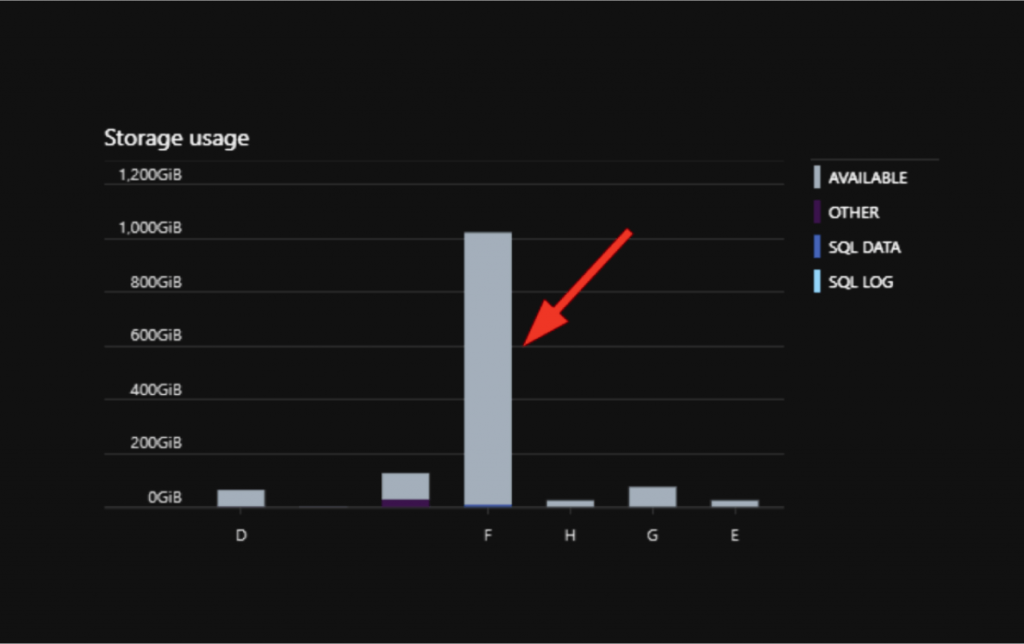
A common occurrence of this happens when provisioning an image from the Azure portal that includes a SQL Server installation. It is in good practice to create multiple disks for SQL to operate correctly and more efficient, however, generally what is provisioned is a 1TB disk by default. In the following screenshot, there is a 1TB disk provisioned, but we are only utilizing about 14GB of space on that drive:
Notes before getting started

  • Disk A refers to original data disk attached to VM (larger disk)
  • Disk B refers to new, smaller data disk


The process


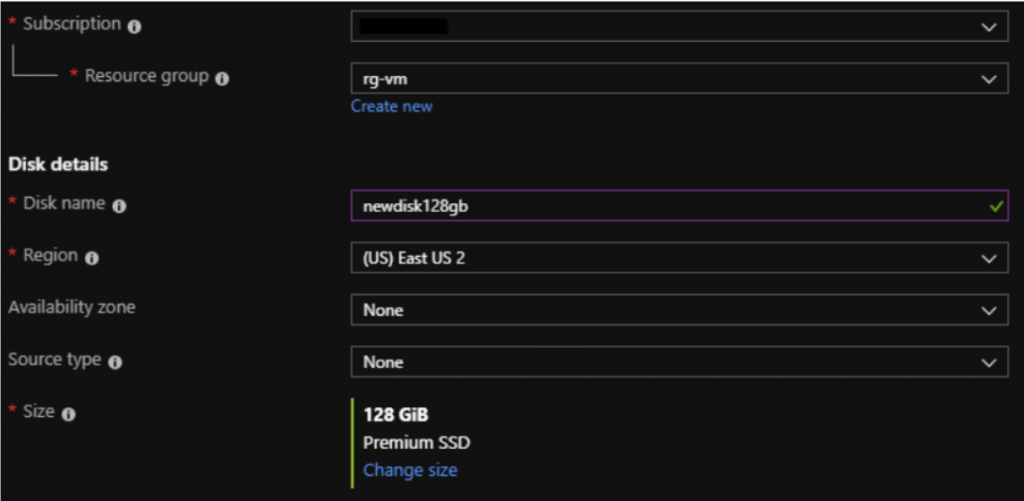
1) Provision Disk B through the Azure portal and attach to desired VM
2) Initialize/Format Disk B within the Azure VM

a. You can assign any drive letter


3) Copy all data from Disk A to Disk B

a. You may have to stop services that are accessing Disk A to complete this task

b. You can use the ROBOCOPY CMD:

robocopy F:\ E:\ *.* /e /sec /Xd System Volume Information $RECYCLE.BIN

c. In this example, F:\ is the source disk (A) and E:\ is the destination disk (B); *.* will copy all
files; /e copies subdirectories; /sec copies files with security; /Xd excludes directories


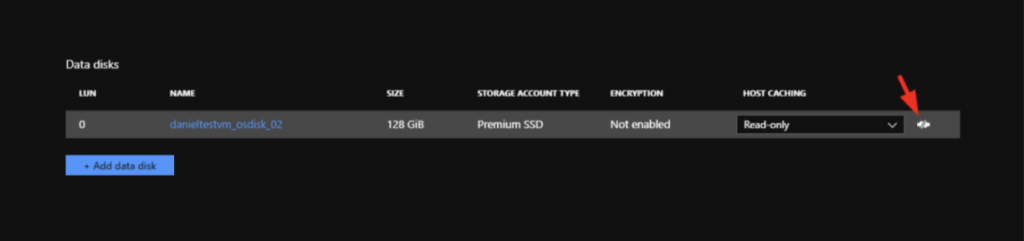
4) Detach Disk A from VM in the Azure portal
5) Change the drive letter of Disk B to reflect Disk A’s original drive letter

6) Start services that were stopped when copying files

7) Test important services to ensure all files are accessible by programs that are needed

8) Delete Disk A from the Azure portal to stop incurring charges

 

Daniel Ruberg
Author

Daniel has over 8 years of Network Administration and Engineering experience. He finished his undergraduate degree in Computer Management Information Systems from Liberty University in 2008. He's obtained several industry leading certifications including: Certified Information Systems Security Professional (CISSP), AZ-300 & AZ-301: Microsoft® Azure Solutions Architect Expert, AZ-500: Microsoft® Azure Security Technologies, Microsoft® Certified Solutions Expert: Cloud Platform and Infrastructure. Daniel has deployed, managed, and migrated several production workloads to Microsoft Azure utilizing the latest technologies that the Microsoft cloud has to offer.

Recommended for you.

What 43,000 students getting governed AI access in weeks actually looked like

What 43,000 students getting governed AI access in weeks actually looked like


Warning: Undefined variable $post in /bitnami/wordpress/wp-content/themes/cfwp/functions.php on line 141

Warning: Attempt to read property "ID" on null in /bitnami/wordpress/wp-content/themes/cfwp/functions.php on line 141

For higher education leaders, the most important AI question is often not whether the technology works. It is whether the institution can make it available broadly, safely, and quickly enough to...

August 26 2026 Blog
Your Projects, Now Easier to Share, Plus Smarter Filters, Comment Controls, and a Clearer View of Context

Your Projects, Now Easier to Share, Plus Smarter Filters, Comment Controls, and a Clearer View of Context


Warning: Undefined variable $post in /bitnami/wordpress/wp-content/themes/cfwp/functions.php on line 141

Warning: Attempt to read property "ID" on null in /bitnami/wordpress/wp-content/themes/cfwp/functions.php on line 141

TLDR: This release turns Projects from a personal workspace into a collaborative one. You can now share a Project with your team and control exactly what each collaborator can do, without needing an...

August 24 2026 Blog
A licensing agreement is not a campus-wide AI strategy

A licensing agreement is not a campus-wide AI strategy


Warning: Undefined variable $post in /bitnami/wordpress/wp-content/themes/cfwp/functions.php on line 141

Warning: Attempt to read property "ID" on null in /bitnami/wordpress/wp-content/themes/cfwp/functions.php on line 141

Higher education’s Shadow AI problem is changing. The first wave was easy to recognize: faculty, staff, and students using public generative AI tools without institutional oversight. Today, many...

August 04 2026 Blog